ART 214 at Saint Mary's College of Maryland with Fereshteh Toosi

13 February 2007

WED homework

For the DADA homework, it will help your reader if you include an image of the 2 pieces you are discussing. You can do this by doing a right-click on the image (before you zoom in) and going to "Copy Image Location". Then you can include the image by uploading it to your site, like this photomontage by Hannah Hoch.

12 February 2007

FTP for Freesound

To FTP to Freesound, please use another free FTP program (like Fugu) called Cyberduck (easy) in the main lab, or try your hand at the command line in Terminal (advanced).

sometimes I say important things in class

Most keyboards and USB hubs operate from power supplied by the USB ports to which they are connected; this does not leave enough power for some brands of flash drive to operate properly. To avoid this, always connect the flash drive to a USB port that is DIRECTLY ON the computer. This means you should not use ones on the monitor (unless the monitor is also the computer), keyboard, or other peripherals. This should allow it to power up properly.

08 February 2007

12-22 Feb schedule :: weeks 5-6

12/13 February
in class: quiz on audio, digital, and mac osx basics (see studysheet below)
LAB: Lynda.com tutorials: introduction, opening/closing documents, about the document, interface and palette tour, undo and history

14/15 February :: no class, FHT at College Art Association meeting
LAB: in lieu of class, you must COMPLETE these Lynda.com tutorials:
Resizing, Cropping and Rotating, Image Adjustments, Saving Your Files, Selections, Layers
HW: post to your blog about Dada. Explore the following website from the National Gallery of Art. Read all 10 descriptions of the 10 art TECHNIQUES used by Dada artists:
http://www.nga.gov/exhibitions/2006/dada/techniques/
Then, choose an artist from list in the BIOGRAPHIES section of the site. Discuss how she or he used the techniques by analyzing at least 2 of his/her pieces. Use the site to zoom in on the images for more detail. Some of the examples also have audio descriptions that will give you more insight about the work. I will be grading these while I'm away so make sure you have posted by your class time otherwise they will be considered LATE.

19/20 Feb
-HW: Read imaging info, pg 2-17 (until figure 13) of this PDF. Write the answers for the review questions 1-20 that are listed in the back of the chapter: I WILL COLLECT THIS. Associated tutorial exercises are not required, but may be helpful to you. Find them here: "Chapter 2: Fundamentals of Digital Imaging"
-in-class: Finish the tutorials and be prepared to discuss the Dada art and techniques that you blogged about last week
-intro to exercise + project 1

21/22 Feb
-HW: each of you will demonstrate a Photoshop technique to the class
1-gradients: Cassie, Winnie
2-brush tool: Gina, Merry
3-clone stamp: Tom, Anne
4-lasso + magnetic lasso: Teresa, Marc
5-quick mask: Emily, Alice
6-eraser + erase to history: Ashley, Shinae
7-healing brush + patch: Elizabeth, Rachel
8- sharpen + smudge + magic wand: Casey, Mike
9-dodge, burn, paint bucket: Alexis, Carly

study sheet for the quiz on Mon/Tues 12/13 Feb

PDF of the study sheet
(no, it won't be open-notes)

06 February 2007

how to FTP

Using FUGU, or any other File Transfer Protocol program (aka FTP), you can access space to store your files. Later we will use this to publish some simple websites, but for now we are using it so that you can make a link from your blog to your MP3s. You must use "SFTP" (this is set automatically Fugu).

HOST: www.smcm.edu.
USERNAME: smcm system username
PW: smcm system(email) password

For more information, consult the SMCM Tech Resources site.

05 February 2007

I always had this idea that doing art was just a masturbatory activity, and didn't really help anybody.

Interviewer: What led you to become an artist?
JB: I always had this idea that doing art was just a masturbatory activity, and didn't really help anybody. I was teaching kids in the California Youth Authority, an honor camp where they send kids instead of sending them to prison. One kid came to me one day and asked if I would open up the arts and crafts building at night so they could work. I said, "If all of you guys will cool it in the classes, then I'll baby-sit you." Worked like a charm. Here were these kids that had no values I could embrace, that cared about art more than I. So, I said, "Well, I guess art has some function in society," and I haven't gotten beyond that yet, but it was enough to convince me that art did some good somehow. I just needed a reason that wasn't all about myself.

LINK TO MP3 CONVERSATION OF BALDESSARI AT THE HIRSCHHORN MUSEUM, DC

Art & Art History department lecture: Heather McGuire on John Baldessari

Wednesday, Feb 7th, Library 321, 4:30
Heather McGuire was graduated from the University of Virginia (B.A. English) and VCU (B.F.A. Crafts). She worked as a curatorial assistant on the Hirshhorn's Visual Music exhibition and curated several gallery shows in Richmond, VA. She is currently pursuing her doctorate in Art History at VCU and beginning her dissertation on John Baldessari's Blasted Allegories. Visit http://www.1708gallery.org/ and click on Exhibitions: Current for a show Heather curated of 2 contemporary artists.

04 February 2007

digitizing your recorded audio

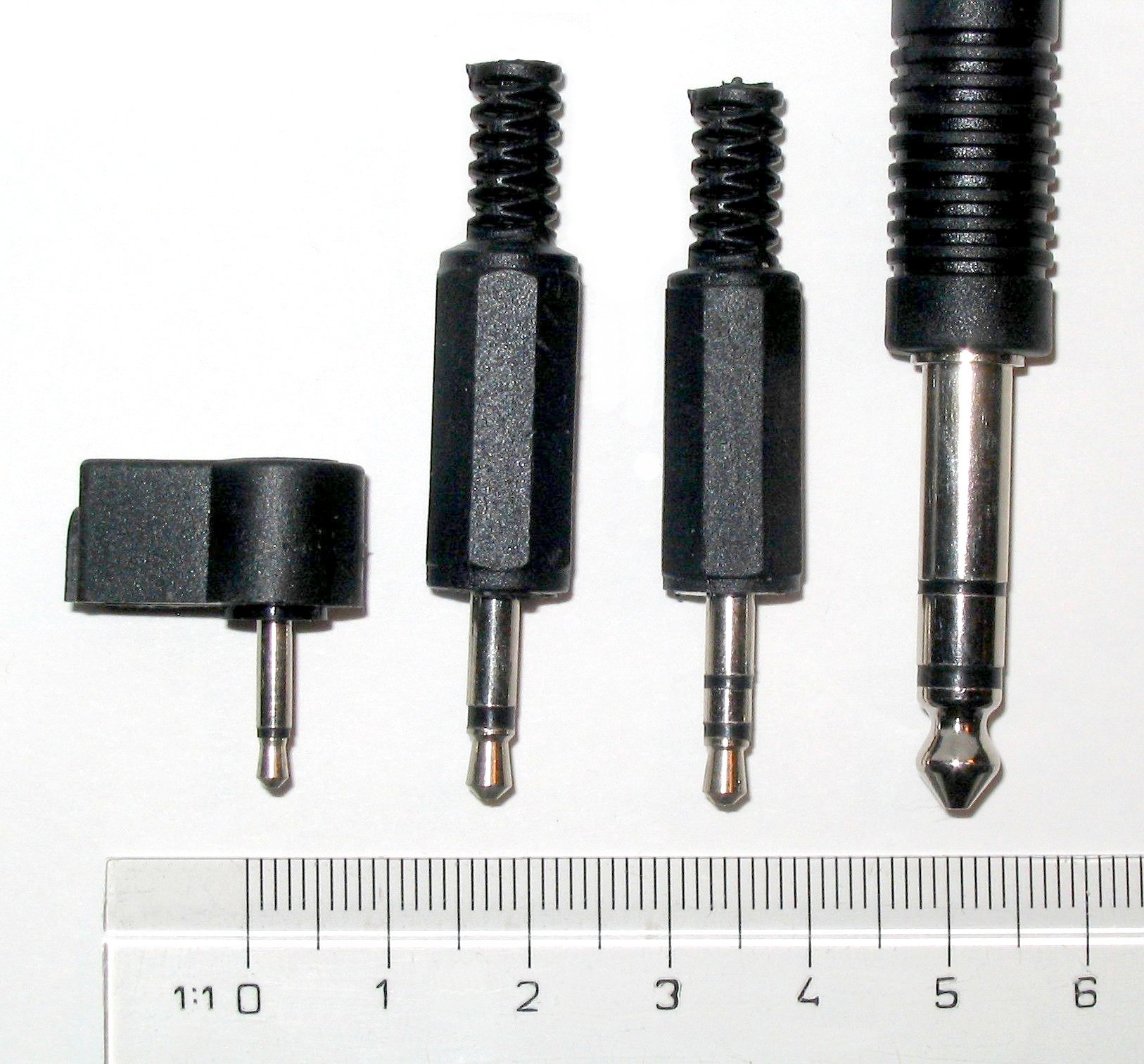
There are various sizes for audio cables. From left to right these are:
- 2.5 mm mono
- 3.5 mm (aka 1/8" or mini) mono and stereo
- 6.3 mm (aka 1/4") stereo

You can tell if it's mono or stereo by the number of rings on the jack: one = mono signal and two = stereo signal.


To bring your recorded audio in to the computer, it is necessary that you have a cable with two 1/8" jacks at both ends. This is an analog, not digital connection. It can be used with both cassette tape and mini-disc.


The jack on left is the 1/8-inch stereo audio input jack, which allows you to connect any audio source directly to the Mac, including a microphone. After you connect, you will need to press play on your tape player. Then press the RECORD button in the Audacity interface, and you will see the audio signal visibly as a track.

The jack on the right is for output only.

31 January 2007

audio project questions

Q: Where is the project description and the Janet Cardiff sound file?
A: To find older items on the blog, just do a search or look under the LABELS list on the side bar. Try "schedule", "project 1" or "artists".

Q: Can I convert an MP3 to a WAV so that I can use it in my project?
A: No. You can convert from a larger file (WAV) to a smaller file (MP3), but not the other way around. It's like trying to expand a sweater that shrank in the wash. Doing so is bad practice and just plain silly.

Q+A: How do I attribute my sources from Freesound?

Q: What are other sites where I can find sound clips?
A: Recording your own sounds is your best option, but you may also try these:
Find Sounds is a search engine that will allow you to search by file type and size.
Sound Dogs is an online sound effects library.
Archive.org is a giant library of all kinds of media, including audio, video, and text.

Q+A: What is Ogg Vorbis?

Q+A: What is FLAC?

Q: Can I use FLAC or Ogg Vorbis for my project?
A: No, because Audacity does not yet support this FLAC, and because Ogg Vorbis is a compressed file type (like MP3s).

Q: What can I check out from Media Services?
A: You can get audio, video and photo equipment, headphones, mics, adapters, and a lot more. Just be sure not to wait until the last minute, as other people might have things checked out.

Q: What is the lending policy at Media Services?
A: AV equipment may be checked out by any student with a college ID. All equipment is checked out for 24-48 hrs.

Q: What are the hours for Media Services?
Here are our extended hours with night shift and student workers for the weekend:
M-Th 8am-10pm
Fridays 8am-5pm
Sat 11am-7pm
Sun 1pm-9pm
You can pickup equipment anytime they are open, but they can provide more support and instruction during the hours the regular staff is in - weekdays 9-5.

Perception-Guided Image Editing

This event is eligible for one of the 5 cultural event blogs you need to do for the semester.

Thursday, February 1, 2007
at 4:10 in Schaefer Hall 134

Perception-Guided Image Editing
Reynold Bailey
Washington University in St. Louis

Traditional artists have developed numerous techniques for creating
interesting visual effects. Many of these artists had very little
knowledge of the inner workings of the human visual system. Instead,
they viewed the human visual system as a black box and through
experimentation they learned to exploit its features. In a sense they
have reverse engineered the human visual system to learn what type of
inputs elicit certain responses in the brain. Modern research from the
fields of Biology, Physics, Psychology, Physiology, and Neuroscience
has given us better insight into the functioning of the human visual
system. Although the visual system is far from being fully understood,
the knowledge we have gained, especially of the early stages of the
visual pathway, is quite substantial.

Modern image editing software is widely used by professional artists
and novices and alike for tasks such as photo retouching, image
authoring and image composition. Commercial software packages such as
Adobe Photoshop and even free packages such as the GNU Image
Manipulation Program (The GIMP) provide powerful image editing and
manipulation features. These features, while mathematically sound,
typically do not take human visual perception into account. In this
presentation, I will discuss a new class of image editing techniques
that are designed to exploit the features of the human visual
system. These techniques can be used to manipulate apparent depth in
an image, create an illusion of motion, and direct the viewer's gaze
about the scene.

26 January 2007

life-saving tips


the top 2 rules for working with digital media:
1-always save to a folder on the desktop...
never save directly to your flash-drive or g-drive
2-back up your project in at least 2 different locations

What this means:
-When you begin working on a project, create a folder that serves as a container to hold your project files. Set scratch disks (see post below) to save to that folder.
-When you finish working for the day, COPY THE FOLDER FROM THE DESKTOP to your flash drive AND g-drive, CD, or other media.
-When you return to work another time, insert the flash-drive into the computer and DRAG THE WORK FOLDER ON TO YOUR DESKTOP.
-Always eject your flash-drive, do not just yank it out of the USB port.

25 January 2007

student art club meeting

Monday, Feb. 5 at 8 pm in the painting studio with free pizza.
Email Monica at mlmilstead@smcm.edu if you are interested or just show up to talk about art activities like a field trip to NYC and the art club film series.

audio project due 7/8 Feb

31 Jan/1 Feb: written proposal due
7/8 Feb: final project due for critiques

The concept for the sound art project is to create a JOURNEY from one place to another. These could be imaginary places or real places, but you will need to have them defined before you start working. Consider the wide range of choices, from the planet Mars to the St. Mary's River. Brainstorm the possibilities for sounds that might represent your places, and what the listener will experience along the way. See http://soundtransit.nl/book/ for inspiration, as well as the links to other projects that address SOUND+PLACE, below.

Technical Requirements:
1-The piece must use at least one 10 second (or longer) clip of a sound that you recorded yourself, either vocals or concrete sounds.
2-The piece must use at least 3 tracks.
3-No songs or music unless you recorded it yourself.
4-You may use additional samples from Freesound, but you may not add any clips that are not under an appropriate license (no copyrighted material).
5-Final mix-down should be at least 1 minute long, but no longer than 3 minutes.
6-Burn your piece as a playable (not data) CD, and bring your project folder with all work files on flash drive. Include one version of your mix-down as a WAV.
7-Post an MP3 version of your project to your blog.

SOUND+PLACE links for inspiration:
Sonic Postcards
Location-Dislocation
Listening to Nature
Falling Echos - Bill Fontana
I am Driving Through Sound Space
Silence of the Lands
Sound Transit
Sonic City
Audiomobile
LocoSound
Broadcast your Podcast

23 January 2007

making sure Audacity works for you

Tutorials due for Wed/Th: http://www.edhsonline.org/other/audacity/
Always work from the desktop, not from your flash drive and never from the G-drive.

CLICK ON PHOTO TO ENLARGE.1- BEFORE you open Audacity, trash your preferences. This means that you will remove any settings and configurations from previous work sessions, so that you can start with a clean slate every time. Go to your HOME directory > LIBRARY > PREFERENCES > Audacity Preferences. It is a stand-alone file. Send it to the TRASH! (See above screen capture image for an illustration of the path).

2- Open Audacity directly from the applications folder, not from the dock and not by double clicking on your project file. Then open your .aup file through FILE > OPEN.

3- CLICK ON PHOTO TO ENLARGE.
Before working in Audacity, EVERYTIME YOU OPEN THE PROGRAM, you need to set your scratch disks. This process tells the program where you will be storing your work files. Go to PREFERENCES > DIRECTORY and choose the FOLDER that you created on the DESKTOP for your project. You may have to restart the program, but you will not have to re-set the scratch disks until the next time you log on.

4- Save early and often.
5- Check the forums for advice

When you record:
++ Remember, you will need a stereo mic and a stereo XLR-mini adaptor when you check out a microphone from Media Services.

questions from the first reading

These were questions and observations generated by the group from the Bourriaud reading. They relate to the underlying concepts behind new media and so we will revisit this discussion many times over the course of the semester.

  • Is there an "original"? What does it mean to make "new" work?
  • When is it OK for an artist to appropriate material from other sources?
  • What rights of ownership do artists have in work that uses reproductive or appropriated material?
  • What is the difference between the ready-made and the sample?
  • If artists are working with recombinative processes to cite creative works from a vast archive of history, how will anything new be added to the database of works that can be borrowed, quoted, and sampled for the future?
  • What is post-modernism?

contemporary Situationists + detournement

David Rees - Get Your War On + my new filing technique is unstoppable
Barbara Krueger
Glowlab - artist collective
In the Flow, art exhibit

22 January 2007

Link to the documentary about the Situationist International

http://www.ubu.com/film/si.html

sound art links

William Burroughs sound cut-ups
William Burroughs film cut-ups
Yoko Ono - Cough Piece 1961/63
John Lennon - Radio Play
Milan Knizak - Broken Music Composition, 1979
Laurie Anderson - Two Songs for Tape Bow Violin, 1977
DJ Food - Raiding the 20th Century, 2004
Gregory Whitehead - various
DJ Spooky - Radio Radio
Steve Reich - live concert, 1970

schedule for 24/25 Jan - 7/8 Feb

W/Th 24/25 Jan
-Bart Simpson audacity tutorial due. Unless you are working from home on a PC you can skip the part about installing the program.
-blog about one of the sound art projects listed above, under "sound art links"
-in-class: intro to audio principles slide show and digital basics, continued

M/Tu 29/30 Jan
Mon. Jan. 29, 4:30 pm LIBRARY 321 - Lance Winn: drawing, robotics, sculpture
exercise 1 due: an audio re-mix using 3 samples from The Freesound Project. You will need an account to download the audio files. Requirements: You may only use .WAV or .AIFF files - no MP3s. Final mix-down will be at least 30 seconds long, with at least 2 tracks of audio. Bring your WAV/AIFF file and the original 3 files to class saved to your flash drive. The attribution aspect of the Creative Commons license requires you to give credit to the original authors, so you will need the names of the users who provided the files for your project. The easiest way to keep track is to make sure that you don't re-name the files you download from Freesound.

W/Th 31 Jan/1 Feb
-writen concept summary + proposal for audio project due - post this to your blog
-Lynda.com tutorial fee due

M/Tu 5/6 Feb
- Gather sounds for your project. Equipment may be checked out from Media Services for recording.
- Post to your blog about the Janet Cardiff radio interview (#1 below) and respond to how she uses the three-level spatial structure in her piece (#2 below). This is described on the class handout. Do not multitask while you do this. Treat it as if you are studying an essay. Folding your socks is possible, but trying to write email or do other homework while you listen is not OK.
-in class: discussion about Janet Cardiff & studio time to work on projects
1- radio piece about Janet Cardiff
2-her project for Whitechapel Gallery in London

W/Th 7/8 FEBRUARY
final audio project due (see post with project description)